Changelog
What's new
User-facing changes to GPT Master, newest first.
v2.13.0
- New Conversation data service captures ChatGPT API responses to power more accurate minimap rendering — rolling out gradually via feature flag.
- Fixed Minimap cache writes are serialized to prevent data corruption from overlapping bookmark operations.
- Fixed Minimap cache is now cleared on sign-out even when no ChatGPT tab is open, preventing stale data from persisting across sessions.
v2.12.2
- New Prompt Library is now available to all users.
- New Anonymous users can browse the Prompt Library palette without signing in — sign-in is only required to create, select, or delete a prompt.
- New Upsell modal redesigned with updated plan comparison and support for annual and weekly billing intervals.
- Changed Upgrade button opens the upsell modal directly in the chat window.
- Fixed Weekly billing interval no longer displays as "Annual" in the Plans section.
- Fixed Prompt Enhance now preserves line breaks from multi-line prompts.
v2.12.1
- New Prompt Library: live search filter in slash-mode — type //filter in the composer to narrow the palette instantly.
- New Prompt Library: result count badge in the palette header and keyboard shortcut hints (↑↓/↵/esc) at the bottom.
- New Prompt Library: starter prompts seeded on fresh install so the palette is never empty.
- Fixed Upsell modal now renders above the prompt library palette instead of behind it.
v2.12.0
- New Prompt Library: save, organize, and insert reusable prompts from a searchable palette. Type // to open the palette inline while composing. Gradually rolling out.
- Changed Feature flags now support percentage-based gradual rollout for safer staged releases.
v2.11.8
- Fixed Feature flag refresh throttle now slides correctly on 304 Not Modified responses, preventing flags from going stale between sessions.
v2.11.7
- New Prompt Enhance extracts a conversation summary before rewriting your prompt, improving rewrite quality in long chats.
- New Compare modal redesigned with a cleaner, more readable side-by-side layout.
- Fixed Text containing "Show more" or "Show less" no longer incorrectly stripped from conversation content during prompt enhancement.
v2.11.6
- Fixed Fixed a race condition in feature flag initialization that could cause repeated service worker restarts.
v2.11.5
- Changed Welcome page plan comparison table reworked with clearer anon/free/pro columns and updated sign-in button copy.
- Changed In-page review prompt polished with updated heading and a Chrome Web Store button with icon.
- Fixed Clarified the "already reviewed" button label in the in-page review prompt.
v2.11.4
- New In-page review prompt surfaces after delight moments (bookmark jumps, follow-up clicks, bulk actions) to ask if GPT Master is working for you.
- Changed Long Chat Speed Optimizer can now be toggled directly from the power panel, not just Admin Hub.
- Fixed Anonymous users who hit their lifetime usage limit now see a sign-in nudge instead of the free-tier upgrade prompt.
v2.11.3
- New Prompt Enhance now shows a compare modal so you can review the rewrite side by side with your original and accept or reject it before it replaces your input.
v2.11.2
- New Multi-select now uses a hover-checkbox pattern: hover a conversation to reveal a checkbox, click to enter selection mode, then use the context menu for bulk actions.
- Fixed Follow-up suggestions now work with all AI models, including those that omit the wrapper tags in their responses.
- Fixed Power button and sidebar whiskers now stay correctly positioned when ChatGPT's native sidebar opens or closes.
v2.11.1
- Changed Prompt Enhance now recognizes casual or already-clear prompts and sends them through unchanged, skipping unnecessary rewrites.
- Changed Prompt Enhance rewrites are more useful on complex and detailed prompts, with low-confidence specifics shown in [brackets] for easy review.
- Fixed Prompt Enhance no longer rewrites casual questions in a formal or corporate tone.
v2.11.0
- New Prompt Enhance: a new button in the ChatGPT composer rewrites your prompt with AI before you send it, with one-click undo.
v2.10.2
- Changed Minimap jumps are now unlimited for free plan users. The weekly cap introduced in v2.10.1 has been removed.
v2.10.1
- New Free plan now includes 20 minimap jumps per week, with a counter and upgrade prompt when the weekly limit is reached. Pro stays unlimited.
- Changed Follow-up suggestion limits now reset weekly instead of daily (5/week for anonymous, 20/week for free).
- Changed Free plan limits adjusted to 8 folders and 4 stars, notes, tags, and bookmarks each.
- Fixed Toast notifications no longer get clipped or pushed off the side of the screen.
- Fixed Sign-in prompt dialog now displays in the correct position.
v2.10.0
- New Pro plan is now available as a monthly or annual subscription. Upgrade from the Plans section inside the extension.
- Changed Plans section shows your active subscription status, next renewal date, and a link to manage billing.
- Changed Grandfathered Pro users see a note explaining their access, with options to start a monthly or annual subscription.
- Changed Checkout and billing errors now appear inline so you know what went wrong instead of seeing a silent disabled button.
v2.9.6
- New Review prompt now walks through a multi-step flow: rate, then leave a Chrome Web Store review or submit feedback, then see a confirmation. Your rating is saved so reloading mid-flow brings you back to the right step.
- New Bulk tag assignment is now available from the folder context menu, with a submenu that repositions itself to stay on screen.
- Changed Minimap scroll-to-item uses a smoother animation that adjusts each frame to absorb layout shifts while scrolling.
v2.9.2
- New In-app review prompt for engaged users who have been using GPT Master regularly.
v2.9.1
- New New folders now start with Work (blue) and Personal (green) as defaults instead of generic placeholders.
- Changed Message navigation buttons in the power button are temporarily hidden pending a UX update.
- Fixed Message navigation scroll now correctly accounts for the sticky header.
v2.9.0
- New Previous/next user-message navigation buttons in the power button for faster movement through long chats.
- Changed Upgrade prompts now appear consistently when free-tier limits are reached for bulk actions, bookmarks, notes, and tags.
- Fixed Drag-and-drop folder assignment no longer double-runs conversation moves in affected flows.
v2.8.0
- New Delete conversations from the right-click menu or the bulk action bar.
- New Long Chat Optimizer: only nearby messages are rendered in long conversations, reducing memory use. Toggle it in Admin Hub under Performance.
- Fixed Minimap depth level is now saved and restored between sessions.
- Fixed Clicking a note card now scrolls to the correct message.
v2.7.0
- New Tags: create tags, assign them to conversations, and filter the sidebar by tag.
- New Tag management in Admin Hub: rename, recolor, delete, and bulk-manage tags.
- New Tag search in the tag picker for quick assignment across large tag sets.
v2.6.0
- Changed Consistent light and dark mode theming across the popup, Admin Hub, and Quick Controls.
- Changed Settings button now opens ChatGPT in a new tab when no ChatGPT tab is active.
- Fixed Floating power button no longer overlaps with the ChatGPT UI.
- Fixed Folder color swatches are easier to distinguish.
v2.5.0
- New Welcome page for new users with clear sign-in and skip options.
- New You can now use GPT Master without signing in (limited features).
v2.4.0
- New Right-click menu on conversations with Copy Link, Move to Folder, Add Note, and View Details.
- New Conversation Details panel showing title, model, message count, folder, and dates.
- New "Add child folder" option in the folder right-click menu.
- New Indent guide lines in the sidebar for easier depth scanning.
- Changed Folder color dot is always visible, using a default color when none is set.
v2.3.2
- New Expand or collapse all folders at once from the right-click menu.
- Fixed Star toggle no longer flashes when toggled.
v2.3.0
- New Notes: write notes on conversations, highlight key passages, and dock notes to the side panel.
- New Pro plans section in the Admin Hub with tier details and feature overview.
- Fixed Conversation titles now stay up to date when you rename chats in ChatGPT.
v2.2.0
- Fixed Discount codes now apply correctly during upgrade checkout.
- Fixed Timestamps show AM/PM consistently.
v2.1.0
- New WhiskerTabs: a floating tab strip on the right edge to open the side panel without covering content.
- New GPT Master logo on the power button and side panel footer.
- Fixed Sidebar now works correctly in non-English ChatGPT interfaces.
v2.0.0
- New Pro tier subscription: unlock unlimited folders, stars, and enhanced follow-ups.
- New In-app upgrade screen with feature comparison and pricing.
- New Free tier: 5 folders, 10 stars, and limited daily follow-up suggestions.
- New First-run onboarding walkthrough for new users.
- New Redesigned side panel with a drag handle and collapse button.
- New In-extension feedback form in the Admin Hub.
- Changed Power button hides automatically when the side panel is open.
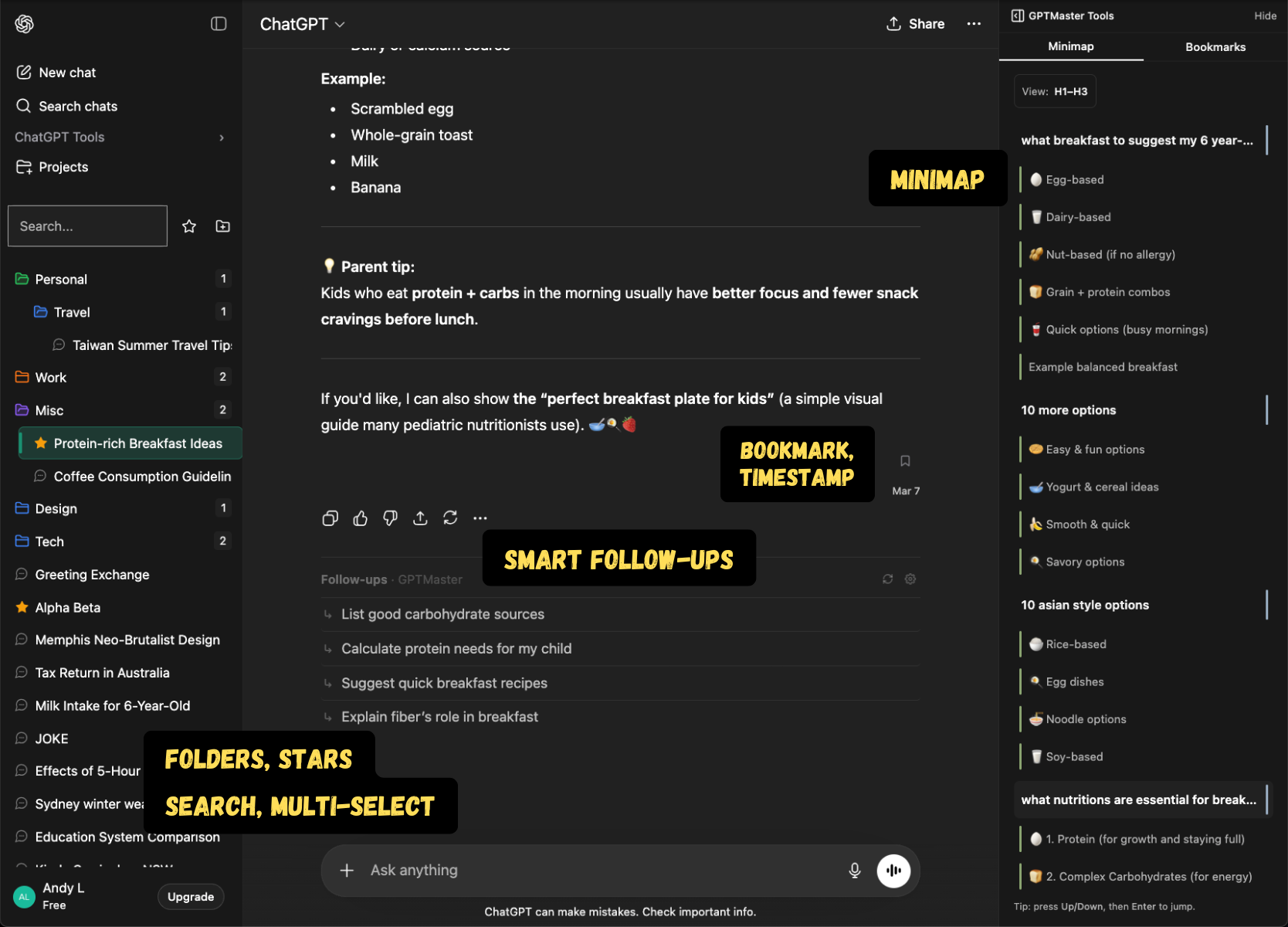
v1.1.0
- New Folder color picker: assign custom colors to folders for faster visual scanning.
- New Collapse the native ChatGPT tools section with a toggle.
- Fixed Active chat highlight stays visible when switching conversations.
- Fixed Folder expansion state is restored after toggling the starred filter.
- Fixed Folder counters now show direct child counts only.
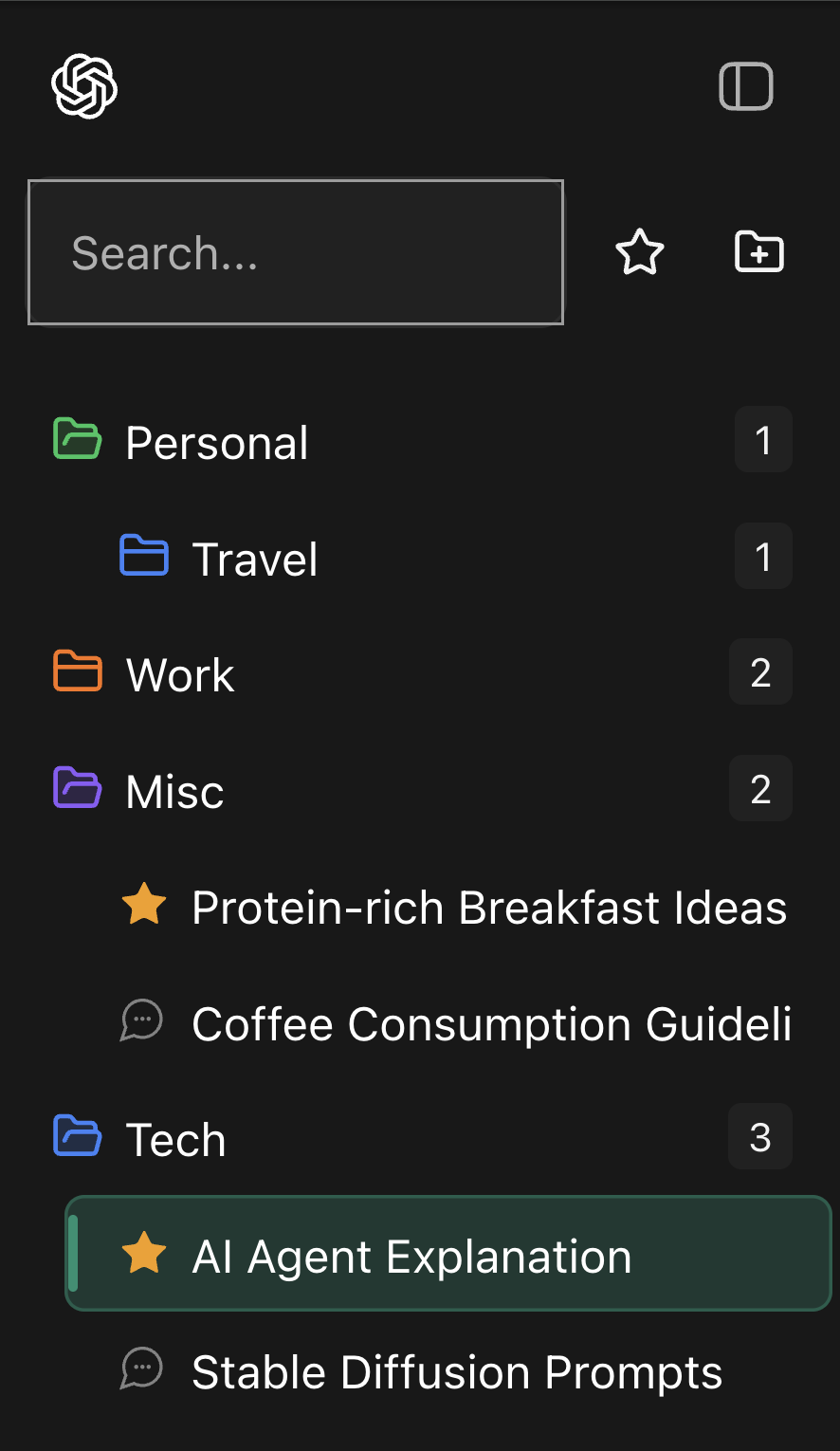
v1.0.1
- New Popup Control Center with account snapshot and quick actions.
v1.0.0
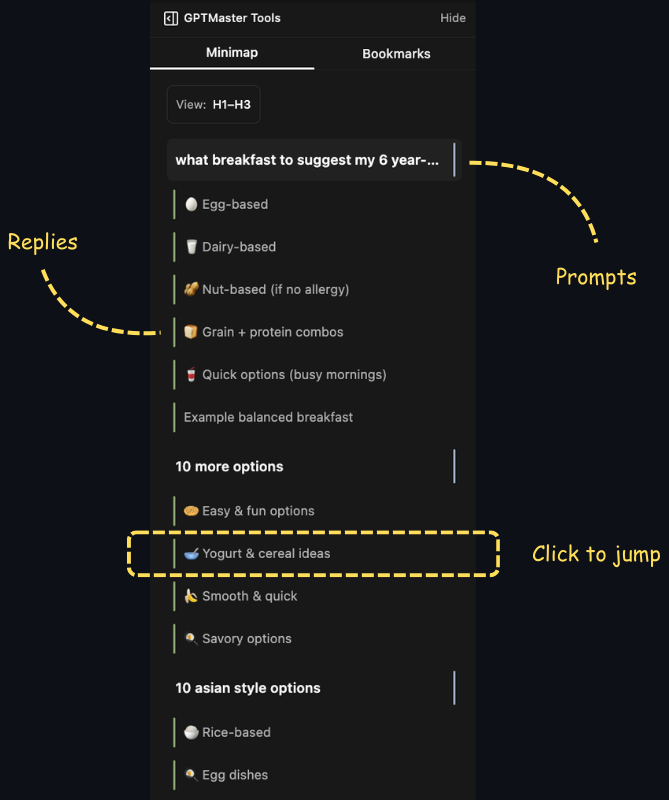
- New Conversation minimap for jumping to any point in long threads.
v0.11.0
- New Multi-select conversations with Cmd/Ctrl and Shift, plus bulk star and archive.
- New Undo for destructive actions (delete, move) with a toast and keyboard shortcut.
- New Bookmark messages inside ChatGPT conversations, with a dedicated bookmarks panel.
v0.10.0
- New Sign in with Google to sync your settings and access your account.
- New Account section in settings with sign-in/sign-out and plan info.
- Changed Sidebar now requires a GPT Master account before showing organization features.
v0.9.0
- New Consent prompt before enabling enhanced follow-up suggestions.
- Changed Follow-up suggestions are now more accurate, with automatic fallback if the service is unavailable.
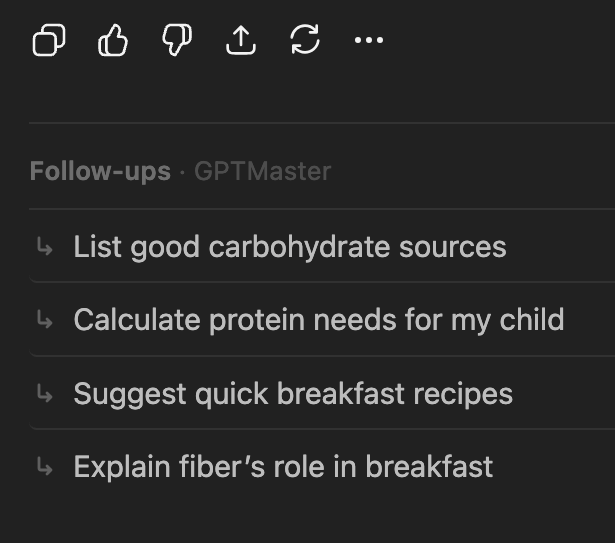
- Changed Refreshed follow-up UI with a header, row-style suggestions, and cleaner loading state.
v0.8.2
- Changed Follow-up chips now appear in a horizontal row instead of a vertical stack.
- Changed Smarter follow-up suggestions that vary based on conversation context.
- Changed Softer folder icons and improved dark mode styling.
v0.8.0
- Changed Follow-up suggestions reworked with dynamic prompts tailored to each conversation.
v0.7.0
- New Settings page for configuring GPT Master.
v0.6.5
- New Rename conversations inline or from the right-click menu.
v0.6.4
- New Archive conversations with one click.
- New Follow-up suggestions in your language (English, French, Chinese, Vietnamese).
v0.6.3
- New Default folders created automatically on first use.
v0.5.0
- New Follow-up suggestions to help you continue conversations.
v0.3.0
- New Improved folder tree with better hierarchy and interactive star toggling.
v0.2.0
- New Drag and drop conversations into folders.
v0.1.0
- New First release of GPT Master: folders and basic conversation organization for ChatGPT.